Wondering if a Roomba is really worth the hype and the price? Here’s a detailed, real-world review covering pros, cons, best models, and smart alternatives.
Let’s face it: we all spend so much time vacuuming, especially with pets, kids, or just shedding season.
I kept seeing those sleek little Roombas zoom across Instagram, claiming to handle it all. But with a price tag ranging from $250 to over $1,000, I had to ask: is a Roomba really worth it? Or is it just a fancy gadget?
If you’re wondering the same, you’re in the right place. Let’s begin…
What Is a Roomba?
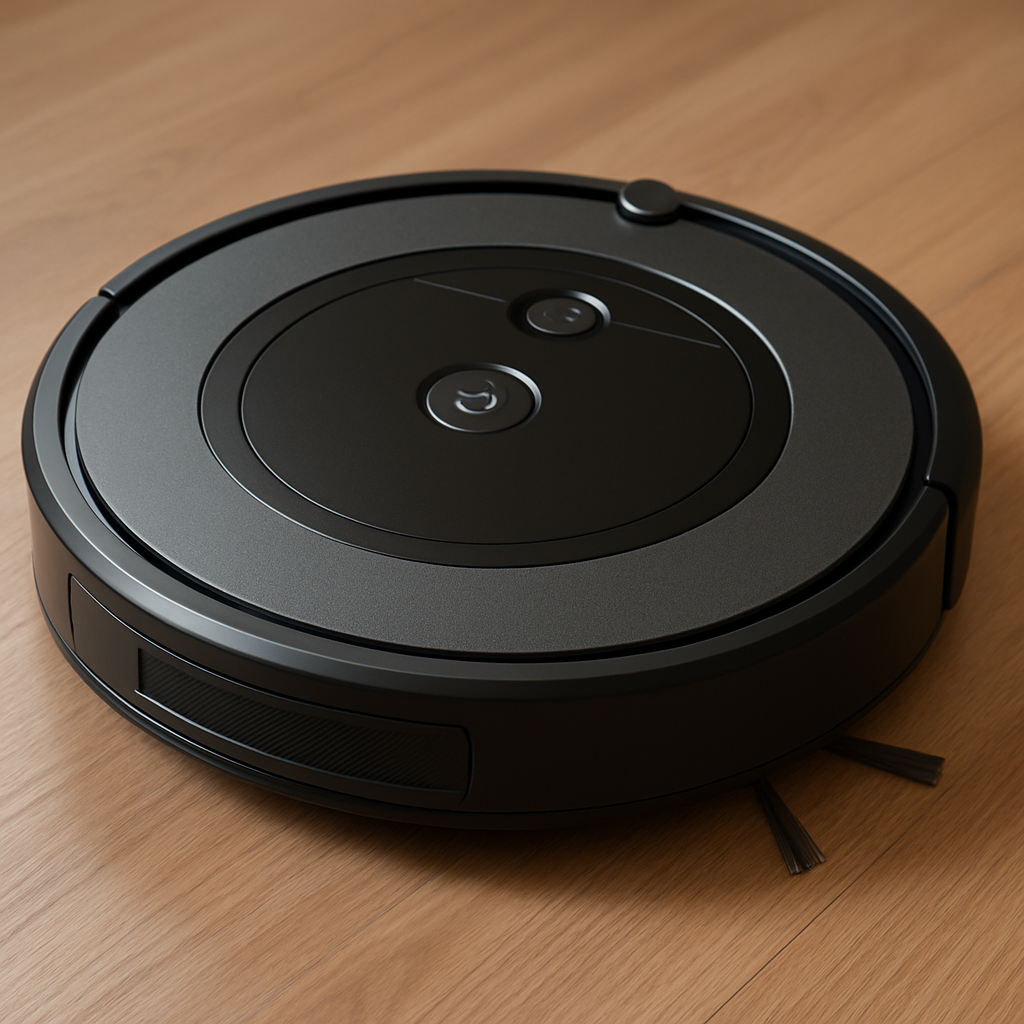
A Roomba is a brand of robotic vacuum cleaner made by iRobot. It uses sensors and AI to map your home and vacuum your floors automatically. Some advanced models even empty themselves or mop in addition to vacuuming.
It’s part of a larger category of robot vacuums, but Roomba is the original—and often seen as the best.
Pros of Owning a Roomba
Let’s get into what actually makes a Roomba worth the splurge for many people:
1. Set-It-and-Forget-It Cleaning
Roombas can be scheduled to clean while you’re sleeping or out of the house. Some people run them daily without ever lifting a finger.
2. Great for Pet Owners
Models like the Roomba j7+ or i7+ are excellent at grabbing dog or cat hair, even from carpets. Many pet owners swear by them.
3. Smart Home Compatibility
You can connect Roombas to Alexa or Google Assistant to start cleanings with voice commands. The high-end models even learn your habits and suggest cleaning schedules.
4. Automatic Dirt Disposal
Some models come with a self-emptying bin, so you don’t have to empty the dustbin for weeks at a time. Big perk.
5. Mapping and Zoned Cleaning
Premium models let you create “no-go” zones (like avoiding cables or my cats’ food bowls) and specify rooms to clean.
Note: don’t sleep on refurbished models! They can be a great deal for your money.
Cons of a Roomba
Of course, it’s not all perfect. Here’s what is giving me pause:
1. High Cost
You’ll pay:
- ~$275 for a basic model (Roomba 692)
- ~$600–$1000+ for premium models with smart mapping and auto-empty features
Not budget-friendly, especially compared to stick vacuums.
2. Doesn’t Replace Deep Cleaning
Roombas are great for maintenance but won’t replace a deep clean (sorry!). You’ll still need to mop and occasionally vacuum by hand, especially in corners and stairs.
3. Can Get Stuck or Miss Spots
Even smart models may get tangled in cords, stuck under furniture, or miss areas if lighting or obstacles interfere.
4. Maintenance Required
Brushes need to be cleaned, dustbins emptied (unless self-emptying), and sensors occasionally wiped. There’s definitely some upkeep involved.
Roomba Model Comparison (2025 Guide)
| Model | Best For | Price Range | Key Features |
|---|---|---|---|
| Roomba 692 | Budget shoppers | ~$275 | Basic scheduling, carpet sensors |
| Roomba i3+ EVO | Pet owners | ~$550 | Smart mapping, self-empty bin |
| Roomba j7+ | Busy households | ~$700–800 | Obstacle avoidance (cords, shoes) |
| Roomba s9+ | Premium performance | ~$900–1000+ | Best suction, edge cleaning, maps |
Are Robot Vacuums Actually Effective?
Robot vacuums have gone from novelty gadgets to household staples in just a few years. But are they actually effective, or are they just another overpriced toy?
Let’s break it down.
What Robot Vacuums Can Do Well
Daily Maintenance: Robot vacuums are great for keeping floors tidy between deep cleans. If you have pets, kids, or just want less visible dust and crumbs, they can be a game changer.
Scheduled Cleanings: Most models let you schedule runs throughout the week. You can literally set it and forget it—wake up or come home to clean floors without lifting a finger.
Smart Mapping: Mid-to-high-end models (like the Roomba j7+ or Roborock Q5+) use smart navigation to map your home, avoid obstacles, and clean room-by-room in a logical pattern. They’re not just bouncing around randomly anymore.
Fits Under Furniture: Robot vacuums can reach under beds, couches, and low-clearance furniture where upright vacuums often can’t.
What They Don’t Do Perfectly
Corners & Edges: Most robot vacuums struggle with deep corners and baseboards. Their round shape and small brushes can miss debris in those areas.
Thick Rugs & High-Pile Carpet: Entry-level models may not have strong enough suction for deep carpet cleaning. They work best on hardwood, tile, and low-pile rugs.
Deep Cleaning: Robot vacuums are meant for maintenance, not for heavy-duty spring cleaning. You’ll still need to do occasional manual vacuuming or mopping.
Stairs: They can’t clean stairs (yet!). You’ll need a traditional vacuum for those areas.
So—Are They Effective?
Yes, robot vacuums are effective at maintaining cleanliness and reducing how often you need to vacuum manually. They shine in homes with pets, kids, or busy schedules. Just know that they’re best as a supplement, not a complete replacement for traditional vacuums.
If your goal is spotless floors every day with minimal effort, they’re one of the most effective home tech investments you can make.
How Long Does a Roomba Typically Last?
When you’re investing several hundred dollars (or more) into a Roomba, it’s fair to wonder, how long will it actually last?
Average Lifespan
Most Roombas last between 3 to 5 years with regular use and proper maintenance. Higher-end models with better components (like the Roomba j7+ or s9+) can even last 6 to 8 years, especially if you replace parts when needed.
The actual lifespan depends on a few key factors:
Factors That Affect Roomba Longevity
1. Model & Build Quality
Entry-level models like the Roomba 600 series may wear out faster than premium models with more durable motors and sensors.
2. How Often You Use It
Daily cleanings will put more wear on the battery, brushes, and wheels. Still, most users find Roombas hold up surprisingly well even with daily use.
3. Maintenance Routine
Cleaning the brushes weekly, emptying the dustbin regularly, and wiping down the sensors every so often can extend the life of your Roomba by years.
4. Replacement Parts
iRobot makes it easy to replace filters, batteries, wheels, and brushes. If you’re willing to spend a little on upkeep, you can dramatically extend the lifespan of your unit.
Battery Life
Roomba batteries typically last about 1.5 to 2 years before needing replacement. The good news? iRobot sells official battery replacements, and installing one is simple.
Some users report better longevity with third-party batteries, but that can vary in quality and may void the warranty.
Signs It’s Time for a New One
- Short battery life (even after replacing)
- Poor suction despite cleaning
- Mapping and navigation errors
- Loud, strange noises from the motor
If your Roomba is over 5 years old and showing multiple issues, it might be time for an upgrade.
Bottom line:
A Roomba is a long-term investment that can last half a decade or more with care. If you take a little time to clean and maintain it, it’ll likely return the favor with years of hands-free cleaning.
What Is the iRobot Controversy?
As popular and trusted as iRobot’s Roomba brand has become, it hasn’t been without some controversy…especially in recent years. If you’ve heard whispers about privacy concerns or corporate shakeups, you’re not alone.
Let’s break down the key issues behind the iRobot controversy.
Privacy Concerns: Are Roombas Spying on Us?
One of the most widely reported controversies involves user privacy, specifically related to Roomba models that use smart mapping and built-in cameras to navigate your home.
In late 2022, a major report revealed that images captured by test Roomba j7+ models had been leaked online, including photos of people in their homes (yikes). These devices were part of a test program meant to improve AI navigation, but the images were reportedly leaked through data annotation services used to train the robots’ machine learning systems.
This sparked public concern around:
- Who has access to the data?
- What’s actually being recorded?
- Are smart vacuums too invasive?
iRobot clarified that the leaked images came from beta testers who had explicitly opted in to data sharing for development purposes. Still, it raised broader questions about in-home surveillance and consent, especially as smart devices become more integrated into daily life.
The Amazon Acquisition Fallout
In 2022, Amazon announced plans to acquire iRobot for around $1.7 billion. Many saw this as a strategic move to strengthen Amazon’s smart home ecosystem (think Alexa + Ring + Roomba).
However, the deal was met with:
- Regulatory scrutiny in the U.S. and Europe
- Concerns over monopolization of smart home data
- Fears that Amazon could use Roomba mapping data to target ads or manipulate home shopping behavior
In January 2024, the deal was officially called off after pressure from the EU over antitrust issues. Soon after, iRobot laid off ~350 employees and their longtime CEO stepped down, which led to speculation about the brand’s stability.
What This Means for Consumers
Despite the headlines, Roombas are still considered safe and secure for general consumers, especially if you:
- Opt out of data sharing in the app settings
- Use a model without a camera if privacy is a concern (e.g., Roomba i3+)
- Stay informed about future software updates and policies
The iRobot controversy is less about the vacuum itself and more about the growing pains of smart home tech. For most users, Roombas still offer incredible convenience…just with an extra reminder to check the fine print before opting into data sharing.
How to Disable Data Sharing on Your Roomba
If you’re concerned about privacy or just want to limit how much data your Roomba sends back to iRobot, you’re not alone. Fortunately, you can take control over what your device shares.
Here’s how to disable data sharing on your Roomba through the iRobot Home app in just a few steps.
Step-by-Step Guide
- Open the iRobot Home App
This is the app you use to control your Roomba, view cleaning maps, and set schedules. - Tap the ☰ Menu Icon (Top Left Corner)
From the main dashboard, open the side menu. - Go to “Settings”
Scroll down and select “Settings.” - Tap on “Privacy” or “Data Sharing”
Depending on your app version, this might be labeled slightly differently. Look for anything related to data usage or consent. - Review & Adjust Your Preferences
You should see options like:- “Share Usage Data with iRobot”
- “Share Maps and Cleaning Data”
- “Participate in Research or Development Programs”
- Save Changes
The app may ask you to confirm your changes. Once saved, your Roomba will no longer upload optional data to iRobot’s servers.
Optional: Disable Smart Maps or Wi-Fi Altogether
If you want to go a step further:
- Disable Smart Mapping (found under each robot’s settings tab)
- Use your Roomba offline by disconnecting it from Wi-Fi (though this limits features like scheduling and app control)
What Disabling Data Sharing Does
- Prevents images or maps from being used for AI training
- Reduces your digital footprint
- Increases peace of mind for privacy-conscious households
Roombas will still clean just fine without sharing extra data, you just lose a few cloud-connected “smart” features, which many users never rely on anyway.
So, Is a Roomba Worth It?
Short answer: It depends on your lifestyle.
It’s worth it if:
- You hate vacuuming or forget to do it
- You have pets, kids, or messy housemates
- You work from home and want a clean space without distractions
- You love tech and automation
It might not be worth it if:
- You live in a small studio or dorm
- You prefer a deep clean once a week with a powerful upright vacuum
- You don’t mind vacuuming manually (or actually enjoy it-some even find it a calming hobby!)
Cheaper Alternatives to Roomba (With Links)
You don’t have to buy a Roomba to enjoy hands-free cleaning. Here are some budget-friendly robot vacuums people love:
| Brand & Model | Price | Why It’s a Great Alternative |
|---|---|---|
| Eufy RoboVac 11S | ~$199 | Quiet, slim, reliable (great reviews) |
| Shark ION AV753 | ~$250–300 | Strong suction, app control |
| Roborock Q5+ | ~$400 | Similar mapping + self-empty feature |
| iLife V3s Pro | ~$159 | Great for hardwood, picks up pet hair |
These are perfect options if you’re not ready to invest in a premium Roomba but want to test the waters.
Final Verdict: Is a Roomba Worth It?
For me? I’m still considering.
That said, the real value depends on:
- How clean you like your floors
- How much you value convenience
- Whether you’re ready to invest upfront
If you’re nodding yes to any of those, a Roomba might just become your favorite home gadget.
Ready to Try One?
Look for:
- Roomba j7+ for the best balance of features
- Roomba i3+ if you want a mid-range pick with auto-empty
- Or start with the 692 (refurbished!) to dip your toes in!
Thanks for reading all about Is a Roomba Worth It? A Real-World Look at Pros, Cons, and Alternatives on burlap+blue!